This video is the first in a series of videos that I am calling tools for the maker's toolbelt. The idea is to provide techniques or "Tools" that you can use in your projects to give them a new feature or wow factor. These tools are not meant to be stand alone projects, but to be used as part of a larger project. Think of them as widgets that you can build off of. The first tool in my maker's toolbelt is Alexa voice control
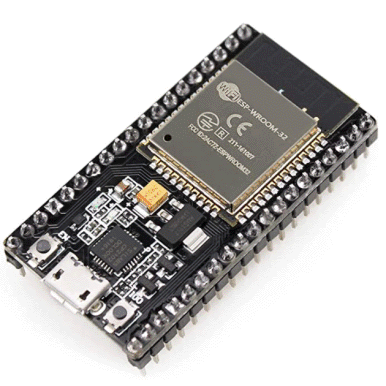
Parts List for the Electronics
Source Code
Source code for this project can be found on my git hub
Sample Network messages
** Step one discovery

UDP packet received from 192.168.86.24
M-SEARCH * HTTP/1.1
HOST: 239.255.255.250:1900
ST: ssdp:all
MAN: "ssdp:discover"
MX: 3

UDP response sent to 192.168.86.24:50000
HTTP/1.1 200 OK
EXT:
CACHE-CONTROL: max-age=100
LOCATION: http://192.168.86.47:80/description.xml
SERVER: FreeRTOS/6.0.5, UPnP/1.0, IpBridge/1.17.0
hue-bridgeid: f008d1d2cb4c
ST: urn:schemas-upnp-org:device:basic:1
USN: uuid:2f402f80-da50-11e1-9b23-f008d1d2cb4c::upnp:rootdevice


UDP packet received from 192.168.86.24
M-SEARCH * HTTP/1.1
HOST: 239.255.255.250:1900
ST: upnp:rootdevice
MAN: "ssdp:discover"
MX: 3

UDP response sent to 192.168.86.24:50000
HTTP/1.1 200 OK
EXT:
CACHE-CONTROL: max-age=100
LOCATION: http://192.168.86.47:80/description.xml
SERVER: FreeRTOS/6.0.5, UPnP/1.0, IpBridge/1.17.0
hue-bridgeid: f008d1d2cb4c
ST: urn:schemas-upnp-org:device:basic:1
USN: uuid:2f402f80-da50-11e1-9b23-f008d1d2cb4c::upnp:rootdevice


** Step two request description.xml

TCP request from 192.168.86.24
GET /description.xml HTTP/1.1
Host: 192.168.86.47
Accept: */*
Content-Type: application/json


Handling /description.xml request
HTTP/1.1 200 OK
Content-Type: text/xml
Content-Length: 765
Connection: close

<root xmlns="urn:schemas-upnp-org:device-1-0">
  <specVersion>
    <major>1</major>
    <minor>0</minor>
  </specVersion>
  <URLBase>http://192.168.86.47:80/</URLBase>
  <device>
    <deviceType>urn:schemas-upnp-org:device:Basic:1</deviceType>
    <friendlyName>Philips hue (192.168.86.47:80)</friendlyName>
    <manufacturer>Royal Philips Electronics</manufacturer>
    <manufacturerURL>http://www.philips.com</manufacturerURL>
    <modelDescription>Philips hue Personal Wireless Lighting</modelDescription>
    <modelName>Philips hue bridge 2012</modelName>
    <modelNumber>929000226503</modelNumber>
    <modelURL>http://www.meethue.com</modelURL>
    <serialNumber>f008d1d2cb4c</serialNumber>
    <UDN>uuid:2f402f80-da50-11e1-9b23-f008d1d2cb4c</UDN>
    <presentationURL>index.html</presentationURL>
  </device>
</root>


** Step three create an authorized user

TCP request from 192.168.86.24
POST /api HTTP/1.1
Host: 192.168.86.47
Accept: */*
Content-Type: application/json
Content-Length: 22

{"devicetype": "Echo"}

Handling devicetype request
HTTP/1.1 200 OK
Content-Type: application/json
Content-Length: 70
Connection: close

[
  {
    "success": {
      "username":  "2WLEDHardQrI3WHYTHoMcXHgEspsM8ZZRpSKtBQr"
    }
  }
]


** Step four fetch list of lights

TCP request from 192.168.86.24
GET /api/2WLEDHardQrI3WHYTHoMcXHgEspsM8ZZRpSKtBQr/lights HTTP/1.1
Host: 192.168.86.47
Accept: */*
Content-Type: application/json


Handling list request
HTTP/1.1 200 OK
Content-Type: application/json
Content-Length: 378
Connection: close

{
  "1": {
    "type":  "Extended color light",
    "name":  "nuclear reactor",
    "uniqueid":  "F0:08:D1:D2:CB:4C:00:00-00",
    "modelid":  "LCB001",
    "manufacturername":  "Signify Netherlands B.V.",
    "productname":  "Hue color downlight",
    "state":  {
      "on":  false,
      "bri":  254,
      "hue":  0,
      "sat":  0,
      "ct":  153,
      "colormode":  "xy",
      "effect":  "none",
      "mode":  "homeautomation",
      "reachable":  true
    },
    "swversion":  "1.53.3_r27175"
  }
}


** Step Five featch details for each light

TCP request from 192.168.86.24
GET /api/2WLEDHardQrI3WHYTHoMcXHgEspsM8ZZRpSKtBQr/lights/1 HTTP/1.1
Host: 192.168.86.47
Accept: */*
Content-Type: application/json


Handling list request
HTTP/1.1 200 OK
Content-Type: application/json
Content-Length: 372
Connection: close

{
  "type":  "Extended color light",
  "name":  "nuclear reactor",
  "uniqueid":  "F0:08:D1:D2:CB:4C:00:00-00",
  "modelid":  "LCB001",
  "manufacturername":  "Signify Netherlands B.V.",
  "productname":  "Hue color downlight",
  "state":  {
    "on":  false,
    "bri":  254,
    "hue":  0,
    "sat":  0,
    "ct":  153,
    "colormode":  "xy",
    "effect":  "none",
    "mode":  "homeautomation",
    "reachable":  true
  },
  "swversion":  "1.53.3_r27175"
}


Turn light on
TCP request from 192.168.86.60
PUT /api/2WLEDHardQrI3WHYTHoMcXHgEspsM8ZZRpSKtBQr/lights/1/state HTTP/1.1
Host: 192.168.86.47
Accept: */*
Content-Type: application/json
Content-Length: 11

{
  "on": true
}

Response:
HTTP/1.1 200 OK
Content-Type: text/xml
Content-Length: 123
Connection: close

[
  {
    "success": {
      "/lights/1/state/on": true
    }
  },
  {
    "success": {
      "/lights/1/state/hue": 21845
    }
  },
  {
    "success": {
      "/lights/1/state/sat": 254
    }
  }
]

Turn light off
TCP request from 192.168.86.60
PUT /api/2WLEDHardQrI3WHYTHoMcXHgEspsM8ZZRpSKtBQr/lights/1/state HTTP/1.1
Host: 192.168.86.47
Accept: */*
Content-Type: application/json
Content-Length: 12

{
  "on": false
}

Response:
HTTP/1.1 200 OK
Content-Type: text/xml
Content-Length: 124
Connection: close

[
  {
    "success": {
      "/lights/1/state/on": false
    }
  },
  {
    "success": {
      "/lights/1/state/hue": 21845
    }
  },
  {
    "success": {
      "/lights/1/state/sat": 254
    }
  }
]


Set light warm white
TCP request from 192.168.86.60
PUT /api/2WLEDHardQrI3WHYTHoMcXHgEspsM8ZZRpSKtBQr/lights/1/state HTTP/1.1
Host: 192.168.86.47
Accept: */*
Content-Type: application/json
Content-Length: 20

{
  "on": true,
  "ct": 383
}

Response:
HTTP/1.1 200 OK
Content-Type: text/xml
Content-Length: 123
Connection: close

 [
  {
    "success": {
      "/lights/1/state/on": true
    }
  },
  {
    "success": {
      "/lights/1/state/hue": 21845
    }
  },
  {
    "success": {
      "/lights/1/state/sat": 254
    }
  }
]


